Wix offers two main products: Classic Wix and Wix Studio. At first glance, they may seem almost identical, and you wouldn’t be entirely wrong.
Both are no-code website builders, both provide customizable templates, and both allow you to create responsive websites.
However, despite these similarities, the two products are designed for different users and use cases. To choose the right one, it’s important to understand their key differences.
This guide breaks down Classic Wix and Wix Studio in detail, helping you decide which option best fits your specific needs.
Please note: both Wix products are excellent. Choosing between them is like choosing between a daughter and a son– there’s no universally better option; it depends on your vision, goals, and the features you value most.
Table of Contents
What Is Classic Wix?
Classic Wix or the regular Wix we use is an HTML-based, no-code website builder that lets you design your website exactly the way you want. Its drag-and-drop interface allows extensive visual customization of every element, from layout to visuals.
Wix has an in-built AI feature, using which you can create your website by answering a few questions. Type what’s on your mind, and Wix will process your input to design your website.
Whether you’re building an e-commerce store or a personal portfolio, Wix has all the essential features to create a professional and functional site without being a tech expert.
With Wix, you can:
- Choose your design from 2,000+ templates
- Build a website using a drag-and-drop builder and an AI Wix website builder.
- Manage bookings, build an eCommerce store, and host events
- Accept secure payments
- And more
Want to create your first website with Wix? Check this step-by-step beginner's guide.
Now that you are familiar with the primary features of Wix, let’s move to Wix Studio.
What Is Wix Studio?
Wix Studio is an enhanced version of Wix, built for professionals, agencies, and developers who need to create advanced, one-of-a-kind website designs.
It’s a high-performance platform that offers a wide range of tools to boost efficiency and provide precise control. Wix Studio is a perfect platform to bring your complicated idea to life.
With Wix Studio, you can:
- Design responsive, grid-based websites
- Create no-code animations and interactions
- Collaborate in real time
- Extend features via the app marketplace
- Manage eCommerce, bookings, and payments
- And more
Top 7 Differences Between Wix Studio and Classic Wix

1. Proportional Scaling
Wix Studio features proportional scaling, which means that once you finish your design in desktop view, you don’t have to worry about completely readjusting it for mobile or other devices.
The studio automatically resizes your design (font size, spacing, layout) to fit different screens. Proportional scaling keeps elements in place without breaking the layout or causing overlap.
Please note: Although Wix Studio scales everything seamlessly, you might need to fine-tune font size, spacing, etc., to make it look perfect. For instance, some elements may become too small to read or tap comfortably.

2. Advanced Animations & Mouse Parallax Effects
Wix Studio offers triggers and animations that let you animate elements with effects like grow, fade, slide, and wiggle, all without writing code.
You can trigger animations upon entrance, loop them, or activate them through clicks, hovers, and scrolling. This allows for interactive and engaging layouts.
On top of that, Wix Studio includes built-in mouse parallax effects that respond to cursor movement. This adds depth and a subtle 3D feel to your website. These native effects need no plugins or custom code and can be easily adjusted to improve visual interest while keeping performance and design consistent across devices.
Here’s a Reddit user insight that offers an unfiltered perspective on using wix site maker:

Source: Reddit
3. Section/bento Grid
In Wix Studio, layouts are created with a grid-based system that includes rows, columns, and cells. This system automatically adjusts to different screen sizes. The grid keeps elements aligned and simplifies responsive design. Designers can split, merge, swap, or hide grid cells.

In contrast, Classic Wix uses free drag-and-drop positioning. It offers visual guides and snap-to alignment for placement, but it lacks a true grid system.
4. Custom CSS
Custom CSS allows you to manually control and change the default look of your website. It gives you more creative freedom to adjust colors, animations, layouts, etc. Although this feature is available in both Classic Wix and Wix Studio, the key difference is how it’s applied.
In Wix Studio, you don’t need to write code separately (No velo required). It provides advanced, CSS-like styling controls at the element level through the Inspector. However, it does not support unrestricted custom CSS files.
In Classic Wix, custom styling is more limited and isn’t applied directly through the editor. You can use Velo by Wix to change styles programmatically, but this works through JavaScript APIs and element style properties instead of by editing raw CSS.
As a result, Wix Studio provides better visual control with its built-in tools, while Classic Wix depends on a mix of editor settings and Velo-based solutions for more advanced styling.

5. Advanced AI
Wix Studio includes tools like Responsive AI, which smartly restructures layouts based on element hierarchy and design best practices. It has an AI Code Assistant that suggests and explains JavaScript code inside the Wix IDE.
There are also AI-powered visual sitemap and wireframe generators that help plan site structure and layout before design starts. Additionally, it offers AI tools for SEO metadata, text generation, image creation, eCommerce product descriptions, and CMS setup.

Unlike Classic Wix, where AI support mainly focuses on content generation, Wix Studio’s AI is part of the professional workflow. It aims to speed up complex tasks, reduce repetitive work, and support better design and development decisions without fully taking away manual control.
6. Figma Integration
Wix Studio offers a unique Figma to Wix Studio plugin. This tool lets you export your Figma designs, such as mockups, layouts, frames, and styles. You can then convert these into live, editable web pages in Wix Studio.


In Classic Wix, there is no direct connection to Figma. Designers cannot import Figma files or frames into the editor. The platform does not recognize Figma styles, grids, or auto-layout structures, which means design systems and responsive behaviors do not carry over.
Figma components cannot be turned into Wix sections or reusable components, and there is no way to sync updates made in Figma back to the Wix site.
7. Real-Time Team Collaboration
Wix Studio has an advanced feature where you can invite multiple team members to collaborate in real-time. Team members can work on the same site and sync changes live, allowing others to review them.
They can be invited with custom roles and permissions, such as editor, reviewer, or admin. This allows you to control who can edit specific pages or sections. Unauthorized actions are automatically blocked based on these role settings.
Studio also includes on-canvas commenting and tagging, so feedback can be left directly on specific design elements or pages. This way, you can clearly communicate and track everything hassle-free.


In contrast, Classic Wix offers only basic collaboration features: you can add contributors or editors to a site with broad permission categories, and team members can edit and leave comments, but there’s no true real-time concurrent editing or live syncing of changes.
Let’s take a quick look at the comparative features in the table below.
Key Differences at a Glance
| Features | Classic Wix (Wix) | Wix Studio |
|---|---|---|
| Design approach | Absolute positioning with fixed pixel values | Responsive, grid-based layout system |
| Proportional scaling | Does not support proportional scaling; elements are positioned in fixed pixels | Elements scale proportionally by default across breakpoints |
| Breakpoint responsiveness | Limited; separate desktop and mobile editors are available | Native breakpoint system with precise control per screen size |
| Responsive behaviors | Basic resizing and alignment tools | Advanced options including percentage-based sizing, CSS Grid, and flexible containers |
| Custom controls/ | Supports Velo by Wix, but customization is | Full Velo support with greater layout |
| code | more limited | and interaction control |
| AI capabilities | Wix ADI for basic site generation | AI-assisted layout creation and content structuring |
| Figma integration | Not supported | Direct Figma-to-Wix Studio import |
| Real-time feedback & live comments | Not available | Built-in collaboration with live comments and feedback |
| Multiple workspaces | Single workspace per site | Numerous workspaces for teams and projects |
| Content mode | Not available | Dedicated Content Mode for editing text and media without affecting layout |
| Target users | Individuals, personal sites, small businesses | Agencies, designers, and large-scale or complex projects |
| Collaboration | Limited role-based access | Advanced collaboration with roles, permissions, and client handoff features |
Pricing
Classic Wix and Wix Studio use different pricing structures, and the Wix price you pay depends on the type of site and features you need:
Classic Wix
- Offers free and premium plans; the free tier includes Wix branding
- Premium plans include hosting, storage, bandwidth, and basic business features
- Higher tiers add eCommerce and marketing tools
- Generally, more affordable and straightforward for simple sites

Wix Studio
- Positioned at a higher tier than Classic Wix
- Pricing reflects advanced features: professional layout tools, team collaboration, responsive grids, and AI-assisted workflows
- Ideal for professional, client, or scalable projects
- Often part of business or agency subscriptions with more capabilities included
Feeling overwhelmed and considering hiring a Wix expert? Hire a Wix expert today.

Key Similarities at a Glance
| Feature | Description |
|---|---|
| Wix ecosystem | Both operate on the same Wix platform. They use a single account, dashboard, billing system, and site management tools |
| Hosting & Security | Free Wix hosting, automatic maintenance, SSL certificates, and built-in security features come with both. |
| App Market integration | Both support the Wix App Market. You can install apps for forms, bookings, e-commerce, marketing, and analytics. |
| Templates | Both offer professionally designed templates that you can customize to fit your brand and content needs. |
| Wix SEO & marketing tools | Built-in SEO basics, email marketing, social media integrations, and analytics are available in both editors. |
| CMS & dynamic content | Both support collections, dynamic pages, and content-driven websites. |
| E-commerce & payments | Wix Stores and payment integrations work similarly in both Classic Wix and Wix Studio. |
Which Platform Should You Choose?
Choose Wix Studio if you’re a designer, developer, agency, or business that needs strong layout control, true responsiveness, collaboration tools, and workflows supported by AI. It works best for complex projects, client work, and scalable sites where structure, performance, and precision matter.
Choose Classic Wix if you’re an individual or small business looking to build a simple website quickly with little learning required. It is great for basic sites where ease of use and speed are more important than advanced customization or responsive control.
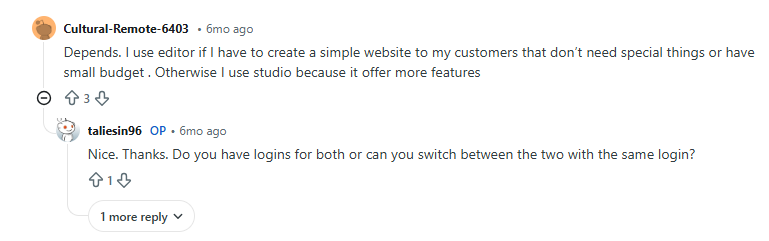
Please note: You can manage Classic Wix from the same Wix account. A single login gives you access to all your Wix projects, whether they’re built in Classic Wix or Wix Studio. This makes it easy to switch between dashboards, manage settings, billing, and domains in one place, without needing separate accounts.
Source: Reddit
Migration Considerations
Can you switch between platforms?
No, you cannot switch or convert a site directly between Classic Wix and Wix Studio. Each site is made for one editor, and after you choose one, you cannot change it.
You can use the same Wix account to create sites on both platforms. However, if you want to switch editors, you must rebuild the existing site manually from scratch.
What transfers and what doesn’t?
Some assets and settings can be reused, but they are not automatically transferred.
You can reuse domain connections, business information, content text, images, and branding; however, these need to be added again manually. Layouts, editor-specific features, grid structures, and responsive settings do not transfer because Classic Wix and Wix Studio use different design systems.
If you’re worried that you may want to scale your business in the future and face migration issues later, it’s better to go with Wix Studio in the first place. If you don’t know how to use it, rely on a professional like Aron Web Solutions to handle the project.
When switching makes sense?
Switching makes sense if your needs have outgrown your current platform. For example, moving from Wix to Wix Studio is worth considering when you need better responsive layouts, teamwork, or scalable client workflows.
However, if you’re building a simple site like a personal portfolio and don’t need structured grids or advanced controls, staying on Classic Wix can help you avoid unnecessary rebuilding.
Conclusion
Choosing between Classic Wix and Wix Studio isn’t about which platform is better; it’s about what fits your goals.
Classic Wix works best for simple websites where speed, ease of use, and minimal setup are important.
Wix Studio is the right choice for complex, scalable projects that need design control, true responsiveness, and collaboration.
Starting with the right platform saves time, money, and future rebuilds.
If you’re unsure which direction to take, Aron Web Solutions can help you decide and build with confidence. Our hands-on experience with both platforms ensures you get a website that works today and grows with your business.